---
title: "The True Cost of an AMS: A Guide to AMS Pricing"
description: Learn the different elements that are typically included in pricing for an agency management system, and see questions to ask vendors when evaluating systems.
image: https://blog.hawksoft.com/hubfs/Pricing%20header%20-%20small.jpg
---
- [Home](http://hawksoft.com/)
- [Product](https://www.hawksoft.com/agency-management-system/)
- [Agency Management System](https://www.hawksoft.com/agency-management-system/)
- [Feature Tour](https://www.hawksoft.com/agency-management-system/tour/)
- [Service That Delights](https://www.hawksoft.com/agency-management-system/wow/)
- [Conversions](https://www.hawksoft.com/agency-management-system/conversions/)
- [Why HawkSoft](https://www.hawksoft.com/why-hawksoft/)
- [Agency Stories](https://www.hawksoft.com/stories/)
- [About Us](https://www.hawksoft.com/about/story/)
- [Our Story](https://www.hawksoft.com/about/story/)
- [Core Values](https://www.hawksoft.com/about/core-values/)
- [Leadership](https://www.hawksoft.com/about/leadership/)
- [Partners](https://www.hawksoft.com/about/partners/)
- [Careers](https://www.hawksoft.com/about/careers/)
- [Support](https://www.hawksoft.com/support/)
- [Contact Support](https://www.hawksoft.com/support/)
- [Submit Support Ticket](https://www.hawksoft.com/support/ticket/)
- [Join a Support Session](https://www.hawksoft.com/support/join/)
- [System Requirements](https://www.hawksoft.com/support/system-requirements/)
- [Download Center](http://download.hawksoftinc.com/)
- [Resources](https://www.hawksoft.com/guides/)
- [Carrier Downloads](http://hawksoftinc.com/agency-management-system/carrier-downloads)
- [HawkSoft University](https://www.hawksoft.com/university/index.html)
- [HUG (HawkSoft User Group)](https://www.hawksoft.com/hugs/index.html)
- [Referral Program](https://www.hawksoft.com/referrals/index.html)
- [Shows & Conventions](https://www.hawksoft.com/shows/index.html)
- [Guides & Brochures](https://www.hawksoft.com/guides/index.html)
- [Contact Us](https://www.hawksoft.com/contact/)
- [Blog](https://hawksoft.com/blog/)
## [HawkTalk Blog](https://blog.hawksoft.com/)
## Industry insights for independent insurance agencies
[](https://www.hawksoft.com/)
[March 30 2026](https://blog.hawksoft.com/guide-to-ams-pricing)
- [Tweet](https://twitter.com/share)
[No Comments](https://blog.hawksoft.com/guide-to-ams-pricing#comments-listing) [agency management system](https://blog.hawksoft.com/topic/agency-management-system), [industry topics](https://blog.hawksoft.com/topic/industry-topics), [Choosing an AMS](https://blog.hawksoft.com/topic/choosing-an-ams)
# The True Cost of an AMS: A Guide to AMS Pricing
[](https://blog.hawksoft.com/guide-to-ams-pricing)
When shopping for an [agency management system (AMS)](https://www.hawksoft.com/agency-management-system/), pricing is an important piece of the puzzle for independent insurance agencies. While it can be tempting to simply compare monthly subscription prices across systems and choose the lowest number, there are several additional costs you might encounter when starting on a new AMS or switching systems.
With pricing models differing between vendors and hidden fees often buried deep in contract terms, it can be difficult to ensure you’re comparing apples to apples. This guide explains the common costs and fees at play when purchasing an AMS, and gives tips on what to ask vendors.
AMS pricing elements
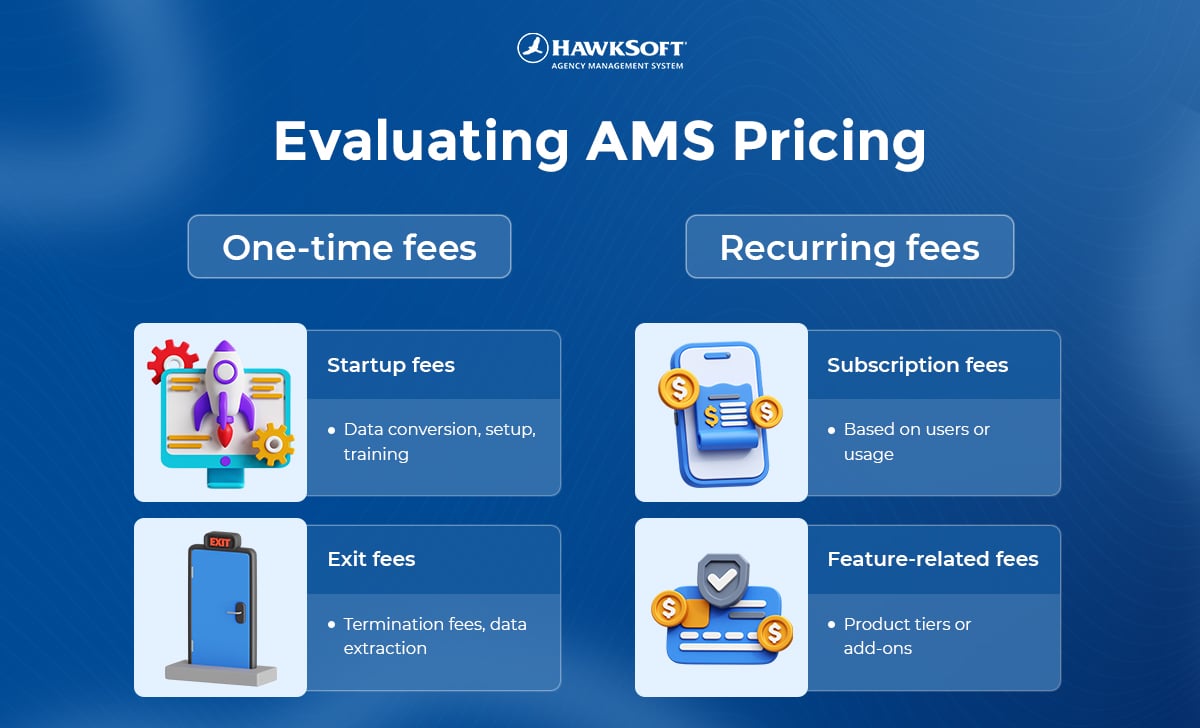
Most AMS vendors include each of these elements in their pricing model, but the way they approach them can differ.
- [One-time startup fees](https://blog.hawksoft.com/guide-to-ams-pricing#startup)(data conversion, setup, training)
- [Recurring subscription fees](https://blog.hawksoft.com/guide-to-ams-pricing#subscription) (user or usage based)
- [Feature-related fees](https://blog.hawksoft.com/guide-to-ams-pricing#feature)(product tiers or add-ons)
- [Price increases and exit fees](https://blog.hawksoft.com/guide-to-ams-pricing#exit)(cancelling or switching systems)
- [Non-product offerings](https://blog.hawksoft.com/guide-to-ams-pricing#value) (service, support, leadership)
## Startup fees
Startup fees include all the one-time costs associated with getting an agency set up in the AMS. It may include the following elements:
1\. Data conversion
If your agency is moving from a previous AMS, there will likely be a charge to convert your previous client and policy data to the new system. This may be a flat fee, or it could depend on the amount of data or hours of work involved.
2\. Setup & configuration
Startup fees generally include the costs associated with provisioning the agency’s database and configuring it to the agency’s needs. This could be a flat fee or hourly fee, or may already be priced into the product.
**3. Onboarding & training**
If the vendor is providing any personal onboarding and training on using the system, it may be included in your startup costs or charged as a separate hourly fee.
While it can be tempting to remove training to cut down on your starting costs, keep in mind the complexity of AMS platforms. Investing in thorough training at the outset will increase staff efficiency and prevent more costly problems over the many years you may use the system.
*Questions to ask vendors*
- How much will data conversion cost? Is it a flat fee or, or does it depend on data volume or hours of work?
- Is configuration of the system included, or is it the agency’s responsibility?
- What is the cost for training and onboarding, and how much is provided? Is it resource-based or personal training?
***HawkSoft’s approach***
- Flat conversion fee per database
- Setup fee includes setup/configuration and personal training sessions with our implementation team (price depends on number of users)
## Recurring subscription fees (user/usage based)
Like most other software products, management systems typically charge an ongoing subscription fee for use of the system. This may be charged on a monthly or annual basis, and is typically determined by user count or usage amount.
User based
Subscription fees are commonly determined by the number of users in the system. Vendors might have a base fee with an additional cost per user, or could charge based on user tiers (e.g. a Basic tier for up to 5 users, Premium tier for up to 30 users, and Enterprise tier for up to 100 users).
Usage based
Some systems may charge on a usage basis (determined by the number of transactions, documents, storage used, or API calls triggered by the agency that month) rather than per user.
***Questions to ask vendors***
- What is the price per user?
- Does the price increase per user, or in tiers?
- How often is the subscription fee charged (monthly, annually, etc)?
- Is the price based on total users (user profiles created in the system) or concurrent users (the number of users active at the same time)?
***HawkSoft’s approach***
- Monthly subscription fee, including a base fee for the first user and a set user fee for each additional user (no tiers)
- No limit on total user profiles created (price is based on number of *concurrent* users, not *total* users) – great for part-time employees or user that only access HawkSoft occasionally.
## Feature-related fees
Because feature needs vary greatly by agency, platforms may charge extra for certain resource-intensive feature sets, such as accounting, reporting, or marketing automation. There are several ways a vendor may approach this.
Make sure you understand what features are included in the base price for the system, and which ones pose an additional cost. One system may appear to cost less upfront, but once all the features your agency needs are included, the price might be higher than other options.
**Product tiers**
Some vendors offer product tiers that include different levels of features. A Basic tier may include only the most essential features, while an Enterprise tier may include additional features needed by larger, more complex, or multi-office agencies.
**Add-ons**
Some vendors include most features in their core subscription and simply offer a few add-on features for an additional cost.
**Integrations**
Instead of offering ancillary features in-house, some platforms give agencies the ability to integrate third-party vendors via API. This lets the agency choose the best solution for their needs, or continue using third-party tools they may already have.
API integrations are typically charged separately by the third-party vendor. The AMS vendor may also charge the agency a fee to enable the integration.
***Questions to ask vendors***
- What features are included in the base price?
- What are the costs for any additional feature sets your agency will need?
- What are the costs of any needed integrations, and is there a cost from the AMS to enable or maintain the integration?
***HawkSoft’s approach***
- One base price for all core features, including all reporting
- Affordable add-ons for texting, E-Signature, and Self-service Certificates (with no user/usage limits)
- A wide variety of [API integrations](https://www.hawksoft.com/about/partners/) offered, with no additional fee to enable integration
## Price increases and exit fees
This is an area agencies sometimes don’t think about until it’s too late. After signing the contract, there are more costs your agency may face over time. It’s crucial to consider these items upfront, before you’re locked into an agreement that may become more costly down the road.
**Price increases**
Every software tool will have occasional price increases to keep up with the cost of living. However, some vendors lure agencies in with a misleadingly low introductory price that will increase significantly after your first year. By the time you realize it, you may already be locked into a multi-year contract.
Ask questions to understand what your pricing will look like beyond your first year, to the next three to five years.
**Termination or exit fees**
Termination fees can come into play if your agency decides to cancel with a vendor before the contract term is up. Make sure you understand how long you’re committing to staying with a vendor, and how costly it will be if you find you’re unhappy with the product and want to leave.
**Data export or extraction fees**
If you decide to leave the vendor, they may charge a fee for you to get your data out of the system so you can bring it to your new AMS. Some vendors hit agencies with fees in the thousands to simply get a copy of their own data – [see stories from real agencies](https://go.hawksoft.com/hostage-challenge?hsCtaTracking=4bd2bac3-e0cf-49f6-a43a-294e6ddf8d5f%7Cc4924b40-ba82-4188-9697-6fe08d7734e5#stories).
***Questions to ask vendors***
- Is the starting price a lower introductory amount, and when does that price end?
- Are there yearly or scheduled price increases, and how significant are the increases?
- What is the length of the contract, and are there termination fees for leaving the vendor before that amount of time?
- Is there a charge to get a copy of your data if you leave?
***HawkSoft’s approach***
- No misleading introductory pricing
- No scheduled price increases (occasional market adjustments)
- No long-term contracts; leave with 30 days of notice
- No termination or exit fees
- No charge to take your data if you leave; export your data on-demand at any time
## Cost vs. value
It can be hard to compare the cost of AMS platforms because their models and capabilities can differ greatly.
Instead of simply comparing the starting cost of one system to another, try to evaluate the total cost of ownership (TCO) for each system, which includes other less obvious factors that affect both the price of the system and the value it provides.
***Questions to ask***
- What quality/value are the non-product elements of the company, such as its service, product support, leadership, and company vision?
- Is the company likely to be sold or change hands in the future?
- How difficult/expensive is it for you to cancel or switch systems if needed?
- How difficult/expensive is it to scale the system as your agency grows in the future (adding users, training, adjusting workflows, etc)?
***HawkSoft’s approach***
- Unparalleled service and product support
- Leaders committed to agency needs
- Privately owned company
- No cost to leave
- Easy to scale (add integrations, add-ons, and users)
By considering all the factors that affect the total cost of an AMS system for your agency, you can determine which platform will provide the most value in return for the price.
| ### Learn more about HawkSoft *Schedule a demo to learn more details about how HawkSoft approaches pricing and what's included in the system.* [](https://hubspot-cta-redirect-na2-prod.s3.amazonaws.com/cta/redirect/2877886/243c44f5-af0a-4cd5-b652-6ca46cbb3ca8) |
| --- |

### Author: Rachel Stauffer
Rachel is the Content Manager at HawkSoft, where she focuses on creating engaging content for the independent agent community.
[agency management system](https://blog.hawksoft.com/topic/agency-management-system), [industry topics](https://blog.hawksoft.com/topic/industry-topics), [Choosing an AMS](https://blog.hawksoft.com/topic/choosing-an-ams)
Previous post: [Improving Farm and Agribusiness Downloads for Independent Agents ](https://blog.hawksoft.com/improving-farm-and-agribusiness-downloads-for-independent-agents)
Next post: [3 Things to Do in the New HawkSoft Community Forum ](https://blog.hawksoft.com/3-things-to-do-in-the-new-hawksoft-community-forum)
Search this site on Google
Search
### archives
- [partner content (73)](https://blog.hawksoft.com/tag/partner-content)
- [HawkSoft news (70)](https://blog.hawksoft.com/tag/hawksoft-news)
- [industry topics (68)](https://blog.hawksoft.com/tag/industry-topics)
- [Automation (45)](https://blog.hawksoft.com/tag/automation)
- [insurance perspectives podcast (27)](https://blog.hawksoft.com/tag/insurance-perspectives-podcast)
### Follow Us
-
-
-
### you might also like

[How to Implement AI at Your Independent Insurance Agency](https://blog.hawksoft.com/how-to-implement-ai-at-your-independent-insurance-agency) [Read More](https://blog.hawksoft.com/how-to-implement-ai-at-your-independent-insurance-agency)
[The HawkSoft Help Portal: Your New All-in-One Help Resource](https://blog.hawksoft.com/help-portal-introduction) [Read More](https://blog.hawksoft.com/help-portal-introduction)
**Address**
1230 SE 3rd Ave
Canby, OR 97013
**Phone**
866-884-4680
**Hours**
Monday – Friday | 6:00AM – 5:00PM
Pacific Standard Time
[© Copyright 2017 HawkSoft, Inc. All Rights Reserved.](https://www.hawksoft.com/)