
Most independent insurance agencies pride themselves on their agency culture and client experience, which is largely cultivated in the office. But your “office space” isn’t just a physical location anymore. Whether your agency is in-person, remote, or a hybrid, a big piece of your working environment is now digital: the spaces and tools your team uses to connect, collaborate, and work.
Here’s the question most agency owners don’t think to ask: is your tech stack helping or hurting your agency culture? Every piece of technology in your agency impacts how your team interacts with each other. Learn why you should care and how you can make technology choices that intentionally facilitate, shape, and protect your culture.
In this article
- Remote work is great. Culture erosion isn’t.
- What's in your digital office?
- 3 steps to building digital culture
- Evaluate your technology as a culture engine
Remote work is great. Culture erosion isn’t.
Remote and hybrid work options are a great way to promote a healthy agency culture. They provide flexibility, facilitate work-life balance, and boost employee satisfaction. But less face-to-face time also means fewer hallway conversations, team lunches, and opportunities for collaboration.
If you’re not intentionally building in time and space for your culture to thrive in a virtual environment, it slowly gets chipped away. Remote work presents a number of challenges:
- Less structure
When there’s no shared space holding everyone to a rhythm, routines, processes, and accountability can all start to drift. - More isolation
People doing great work in separate rooms can still feel disconnected from the team, creating silos where individual team members are working in a vacuum. - Fewer spontaneous moments
The quick “got a minute?” conversations, the shared laughs, the organic collaboration — none of that happens as naturally in a digital environment. - Blurred boundaries
Less delineation between home and office can cause burnout and lead to confusion over roles, hours and availability, and more.
So how do you maintain connection, collaboration, and culture when your team isn’t sharing the same physical space every day? You need an intentional framework for the environment where your team is spending their time: your digital workspace.
What’s in your digital office?
Your agency’s physical office isn’t just a building. It’s an environment that shapes how people feel, work, and connect. Your digital office should work the same way.
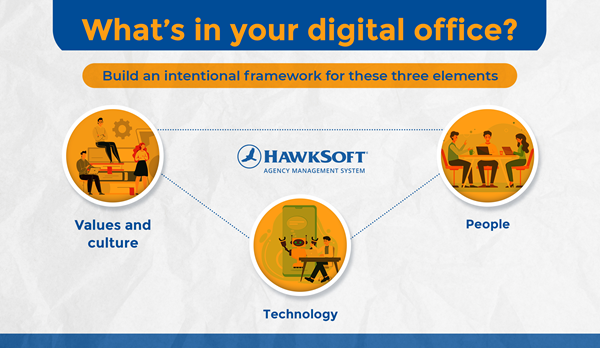
Think about it in terms of these three elements:
- Values and culture
How do your agency’s values, core beliefs, and client experience manifest in a remote work environment? - People
Your staff are the beating heart of your agency. How do they communicate, collaborate, and show up for clients and each other in a digital workspace? - Technology
Your agency’s software tools and systems are the building blocks that make up your digital office. How do they connect your people, translate your values and culture into reality, and shape how work gets done?
You won’t be able to make sweeping changes to these areas overnight, but you can start taking steps to help them interact in more meaningful ways.
3 steps to building digital culture
Not sure where to start? Here’s a simple 3-step roadmap on how to start building an intentional remote culture.
1. Define your space
Before you add another software subscription, get clear on what you actually want your digital office to feel like. What parts of your company values and culture do you want it to enable? What does your ideal client experience look like? What individual and team behaviors belong in your space, and what doesn’t?
Once you’ve got answers, you’ve got criteria for evaluating whether tools, processes, and people are helping or hurting the atmosphere you want to create.
2. Build the structure to support it
Determine standards for how work should be input, routed, processed, and documented. Make sure handoffs and ownership are clear so things don’t fall through the cracks or boil over. Build standard operating procedures (SOPs) everyone can easily access and follow. Choose tools that match your vision, and be specific about how they should be used.
Your AMS should be at the center of your structure, as the source of truth for client and policy documentation, performance monitoring, and task management. If you’re using HawkSoft, you can configure things like task templates and settings, correspondence templates, and user permission templates to make sure processes are standardized and easy for anyone at the agency to complete. You can also use project and team management tools such as Microsoft Sharepoint and Teams to create a structured place for your team to share info, save files, and collaborate.
3. Make space for digital rituals
Culture is about more than work. The spontaneous moments that happen naturally in a physical office need to be intentionally built into a virtual environment.
Put aside a few minutes each week for check-ins, shoutouts for wins, chat channels for sharing pet pictures, or virtual coffee breaks with coworkers. Encourage employees to have their cameras on during meetings to get face-to-face interaction. No matter how small or inconsequential it may seem, preserving moments of fun will fight burnout and help the team feel connected and valued.
Evaluate your technology as a culture engine
Once you’ve defined the space, structure, and rituals you want to maintain, you can evaluate how well your agency’s tech helps you achieve it. This includes your agency management system, which plays a critical role as the hub where staff works every day, as well as email and communication tools, project management tools, and other technology your team frequently uses.
Explore how each piece of your tech stack can help you meet your goals – here are a few things good technology should help your agency enable.
Visibility and information sharing
The lack of transparency in a remote environment can cause confusion, resentment, and accountability issues. See how your tools can be used to make important information more accessible across the team, and give managers insight without having to check in. Are there places to post important memos, collect ideas and suggestions, and monitor agency KPIs and performance?
HawkSoft Tips: Admins can customize the Agency Announcements section of your start page to post updates, reminders, KPIs, and other info you want to keep front and center each time your team logs into HawkSoft. Keep an eye on your Agency Intelligence dashboard to monitor agency metrics and performance.
Communication, collaboration, and engagement
Good tools lower the barrier to connection. They should allow your team to ask questions, share wins, and work through problems together — preferably without having to switch between tools. Your tools should enable training, mentorship, and leadership.
HawkSoft Tips: You can create Working Documents in HawkSoft to allow files like Word documents and Excel spreadsheets to be editable across your staff while keeping it saved as an attachment in HawkSoft. Team members can also use log notes and tasks features to communicate and collaborate on tasks for clients.
Structure and process clarity
Clear workflows and standardized processes give your team a reliable foundation. Without them, things fall through the cracks and frustration builds. Explore whether your tools can be configured at an agency level, and build in templates for workflows wherever possible so your staff is doing things the same way from person to person.
HawkSoft Tips: Admins can configure sales pipeline statuses for tracking clients and prospects, and correspondence templates to standardize emails and other communications across the agency. Configure Activity Tags to make it easy to report on common client interactions, and create task templates to attach standardized instructions, assignees, and more for for routine tasks.
Increased productivity
Your team is happier when they can do their work efficiently, and your technology is what helps them accomplish it. Does your technology help your staff streamline and automate their processes? Are there any pain points that need to be addressed? Are there features you may not be currently using that can help? Are your tools integrated with your AMS so you’re not entering things in multiple places?
HawkSoft Tips: Make sure you've set up time-saving features like Download Task Rules and Default Task Rules, which automatically create and assign tasks to the appropriate team member based on downloads or client actions. Use HawkLink to autofill client and policy data to carrier portals and insurance websites.
Our partner integrations allow you to integrate a host of time-saving tools that can use your HawkSoft data and log things back into HawkSoft. Check out our Tips and Tricks page for more suggestions on increasing efficiency in HawkSoft!
Culture deployment
How work gets tracked, recognized, and communicated about sends a message. Does your tech stack help you focus on what’s most important to your agency? Does it help you keep your values top of mind for employees, enable them to live your core tenets, and facilitate recognition?
HawkSoft Tips: Post your agency's values and goals in the Agency Announcements section of the HawkSoft start page to keep them top of mind for your team. Use client tags, client notes, and client custom fields to keep personalized info about your clients handy so staff can facilitate your agency's ideal client experience. Use activity reports and other reports to identify and recognize employees for completing items that are important to your agency.
Technology is not neutral. It either reduces stress or creates it. It either enables mentorship or blocks it. It either reinforces trust or undermines it.
If a tool doesn’t hold up under this evaluation, it doesn’t deserve a place in your digital office.
The tools are the easy part
Building a digital office that fuels your culture doesn’t necessarily mean having a huge host of software tools or the most expensive technology. It just means making decisions about technology with intention.
Good systems should reduce friction, leaving people with more emotional energy for people. Less stress, more patience, and better collaboration in turn fuels culture.
Take a look at your digital office. Does it reflect the culture and values of your agency? Start taking small, deliberate steps to define your space, build the structure to support it, and create space for moments that bring your team together. The rest will follow.
More on managing remote teamsLearn how to increase satisfaction, boost productivity, and alleviate burnout on remote teams.
|